
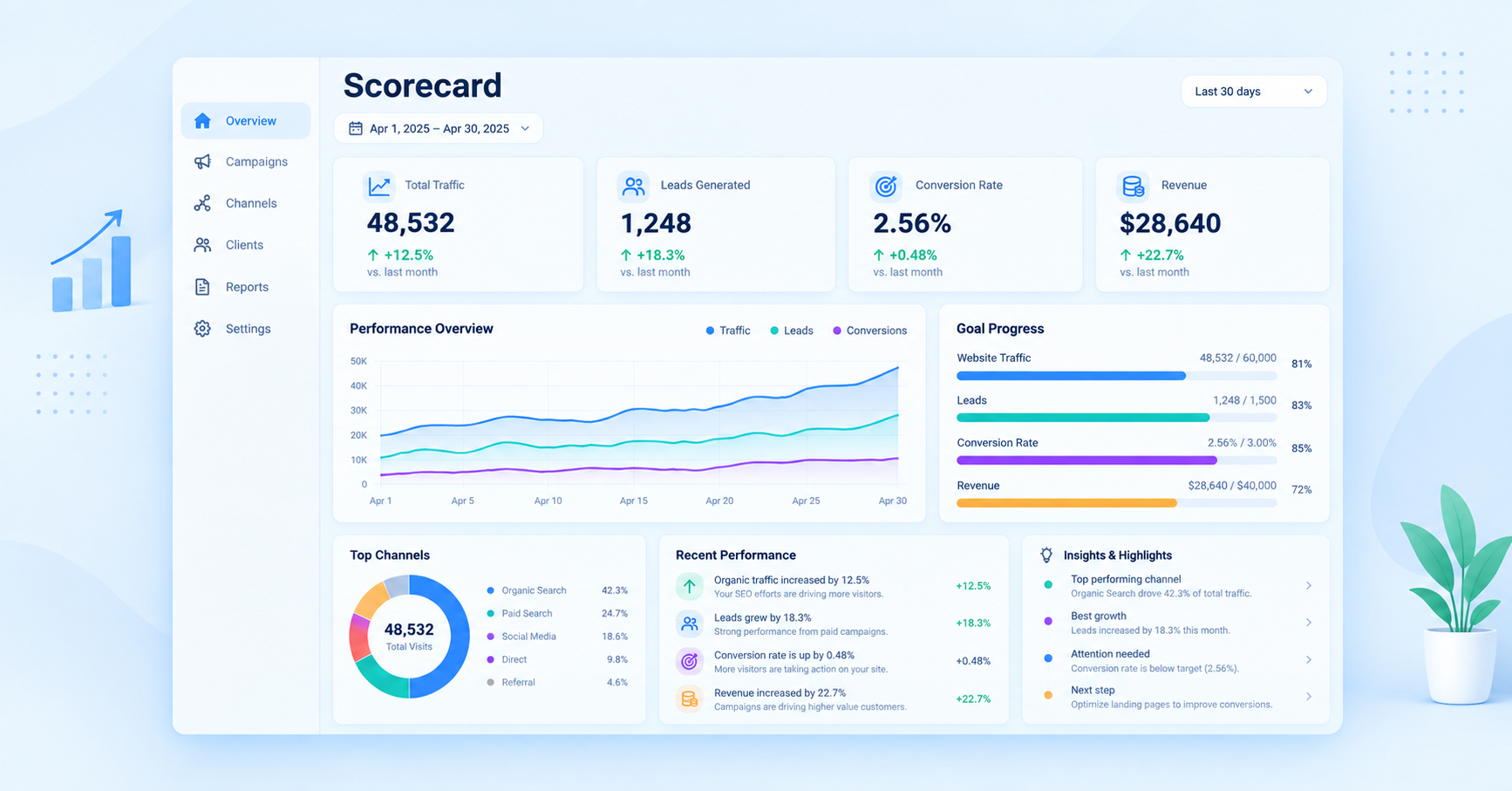
Marketing agencies have access to more data than ever. SEO, paid ads, social media, email, website analytics, CRM, and project management platforms all generate important numbers. But having more data does not always mean having better visibility.
For many agencies, the real challenge is turning all those numbers into a simple view of client performance and growth.
This is where a client scorecard can help.
A client scorecard brings important KPIs into one place so agencies can quickly understand what is working, what needs attention, and whether a client is moving toward their goals. Instead of sending clients pages of reports and spreadsheets, agencies can provide a clearer picture of performance.
The right client scorecard software can make this process faster by combining KPI tracking, reporting, goals, insights, and client communication in one workflow.
In this guide, we will look at what client scorecards are, why agencies need them, which features matter, and how to choose the best software for tracking KPIs and client growth.
Table of Contents
- What Is a Client Scorecard?
- Why Agencies Need Client Scorecard Software
- What Should a Client Scorecard Track?
- Key Features of Client Scorecard Software
- Benefits of Using a Client Scorecard
- Best Client Scorecard Software for Agencies
- How to Compare Client Scorecard Tools
- How to Choose the Right Client Scorecard Software
- Common Client Scorecard Mistakes Agencies Should Avoid
- How Agencies Can Use Scorecards to Improve Client Growth
- Frequently Asked Questions
- Final Thoughts
What Is a Client Scorecard?
A client scorecard is a simple way to monitor and present the most important performance indicators for a client.
Instead of showing every available metric, a scorecard focuses on the numbers that matter most to the client’s business goals.
For example, an SEO agency might track:
- Organic traffic
- Keyword rankings
- Organic conversions
- Backlinks
- Leads
- Conversion rate
A paid advertising agency may focus on:
- Ad spend
- Clicks
- CTR
- CPC
- Conversions
- Cost per acquisition
- ROAS
The purpose is not simply to collect metrics. It is to understand whether marketing activity is helping the client move closer to their goals.
Client Scorecard vs. Traditional Marketing Report
A traditional marketing report can contain dozens of charts, tables, and metrics. While detailed reporting has its place, clients do not always need to study every number.
A scorecard takes a different approach.
It answers questions such as:
- Are we on track?
- Which KPIs are improving?
- Which metrics are falling?
- What needs attention?
- Are we achieving the client’s goals?
This makes a scorecard particularly useful for agencies managing multiple clients.
Why Agencies Need Client Scorecard Software
Creating a scorecard manually can become difficult as an agency grows.
An agency may have data spread across Google Analytics, Google Ads, Meta Ads, Search Console, HubSpot, CRM systems, SEO platforms, and project management tools.
Someone then has to collect the data, update spreadsheets, calculate KPIs, create charts, check changes, and prepare the final report.
That process takes time.
Manual Reporting Creates Unnecessary Work
Imagine an agency with 20 clients.
If the team spends two hours preparing each client’s monthly performance report, that is 40 hours of reporting work every month.
The problem becomes even bigger when reports need to be customized for different clients.
Client A may care about leads.
Client B may care about revenue.
Client C may care about SEO visibility.
Client D may focus on ROAS.
A good client scorecard software solution can reduce repetitive reporting work by bringing important metrics into a centralized system.
Agencies Need More Than Data
Clients rarely want data for the sake of data.
They want to know what the data means.
A scorecard can help agencies move the conversation from:
“Here are your numbers.”
to:
“Here is what changed, why it changed, and what we should do next.”
That difference can improve client communication and make reporting more valuable.
What Should a Client Scorecard Track?
The KPIs included in a scorecard should depend on the client’s objectives.
There is no single list of metrics that works for every agency or client.
Marketing KPIs
Common marketing KPIs include:
- Website traffic
- Leads
- Conversion rate
- Cost per lead
- Customer acquisition cost
- Marketing-qualified leads
- Sales-qualified leads
- Revenue
- Return on investment
SEO KPIs
SEO agencies may track:
- Organic traffic
- Keyword rankings
- Search impressions
- Click-through rate
- Organic conversions
- Backlinks
- Indexed pages
- Top-performing landing pages
Paid Advertising KPIs
For PPC and paid social campaigns, useful metrics include:
- Ad spend
- Impressions
- Clicks
- CTR
- CPC
- Conversions
- Conversion rate
- CPA
- ROAS
Client Growth KPIs
Agencies focused on business growth can also track:
- Revenue growth
- Lead growth
- Customer growth
- Conversion growth
- Retention
- Pipeline value
- New opportunities
The key is to avoid filling the scorecard with every metric available.
Key Features of Client Scorecard Software
The best client scorecard software should make performance tracking easier, not more complicated.
Here are some features agencies should consider.
KPI Tracking
KPI tracking is the foundation of a client scorecard.
The software should allow agencies to select relevant KPIs and monitor them over time.
Ideally, teams should be able to see:
- Current performance
- Previous performance
- Target
- Percentage change
- Status
- Trend
This gives both the agency and client a quick understanding of performance.
Goal Tracking
KPIs become more meaningful when connected to goals.
For example, instead of simply showing that a website generated 500 leads, an agency can show:
Goal: 600 leads
Current: 500 leads
Progress: 83%
This provides context that a standalone number cannot.
Automated Data Integration
Agencies should not have to manually copy data from multiple platforms every month.
Integrations can connect data sources and bring information into the scorecard automatically.
Depending on the software, integrations may include platforms such as:
- Google Analytics 4
- Google Ads
- Google Search Console
- HubSpot
- Meta Ads
- CRM platforms
- Project management tools
Automation can significantly reduce repetitive reporting work.
Custom Scorecards
Every client has different objectives.
Therefore, agencies should be able to customize scorecards based on the client’s business model, campaign goals, and reporting requirements.
For example, an ecommerce client may need revenue and ROAS, while a B2B company may care more about leads and pipeline.
Visual Dashboards
A scorecard should be easy to understand at a glance.
Useful visual elements include:
- KPI cards
- Charts
- Progress indicators
- Trend lines
- Status indicators
- Goal progress
- Performance summaries
Good visualization helps clients understand results without spending a lot of time analyzing spreadsheets.
AI-Powered Insights
AI can make scorecards more useful by helping agencies interpret performance.
Instead of simply reporting that traffic increased by 18%, an AI-powered system can help identify significant changes and summarize important trends.
This can help agencies spend less time interpreting raw data and more time deciding what actions to take.
Client-Friendly Reporting
The scorecard should be understandable to people who are not marketing experts.
A client should be able to open the dashboard and quickly understand:
- What is going well
- What is not going well
- What changed
- What the agency is working on
- What the next priorities are
Benefits of Using a Client Scorecard
Using a scorecard can improve more than reporting.
Saves Reporting Time
Automation reduces the amount of manual work involved in collecting and organizing data.
Instead of building every report from scratch, agencies can create reusable scorecard templates.
Improves Client Transparency
Clients can clearly see how campaigns are performing against agreed goals.
This can create more transparency around agency work and marketing results.
Makes Meetings More Productive
A scorecard gives client meetings a clear structure.
Instead of spending most of the meeting explaining numbers, the agency can focus on:
- Wins
- Problems
- Opportunities
- Next steps
Helps Identify Problems Earlier
A scorecard makes it easier to notice KPI changes.
For example, if conversions fall while traffic remains stable, the agency can investigate the conversion funnel instead of assuming the campaign is performing normally.
Supports Better Client Retention
Clear reporting can contribute to stronger client relationships.
When clients understand the value being delivered, conversations become less focused on “What are we paying for?” and more focused on “How can we grow further?”
Best Client Scorecard Software for Agencies
There are many reporting and dashboard platforms available, but agencies should evaluate them based on their specific needs.
1. StatNexa
StatNexa is a unified reporting platform designed for modern marketing agencies.
It brings reporting, performance tracking, and client management into a centralized environment. Agencies can use it to organize important marketing information and create a clearer view of client performance.
Its approach is particularly useful for agencies that want to combine KPI tracking with scorecards and AI-powered summaries.
Why Agencies May Consider StatNexa
Key areas to evaluate include:
- Client reporting
- KPI tracking
- Scorecards
- OKR tracking
- AI summaries
- Marketing data integrations
- Client-focused dashboards
For agencies managing several clients and multiple marketing channels, having these capabilities in one platform can reduce the need to switch between different tools.
2. AgencyAnalytics
AgencyAnalytics is a reporting platform built around digital marketing agencies.
It offers dashboards and reporting features designed to help agencies bring marketing data together and share performance information with clients.
It can be useful for agencies that need automated reporting and client-facing dashboards.
3. Whatagraph
Whatagraph focuses on marketing performance reporting and data visualization.
It can help agencies bring information from multiple marketing channels into centralized reports.
Its visual reporting approach can be useful when clients want an easy-to-understand view of campaign performance.
4. Looker Studio
Google Looker Studio can be used to create customized marketing dashboards.
It is flexible and can connect with several Google and third-party data sources.
However, agencies may need more setup and maintenance compared with dedicated agency reporting platforms.
5. Databox
Databox is focused on business analytics, KPI monitoring, and dashboards.
It can be useful for agencies that want to track performance against goals and provide clients with visual KPI reporting.
Client Scorecard Software Comparison
| Software | KPI Tracking | Client Dashboards | Automation | AI Insights | Agency Focus |
|---|---|---|---|---|---|
| StatNexa | Yes | Yes | Yes | Yes | High |
| AgencyAnalytics | Yes | Yes | Yes | Varies | High |
| Whatagraph | Yes | Yes | Yes | Varies | High |
| Looker Studio | Yes | Yes | Requires setup | Limited | Medium |
| Databox | Yes | Yes | Yes | Yes/varies | Medium |
Features and capabilities can change over time, so agencies should verify the latest plans, integrations, and functionality before choosing a platform.
How to Compare Client Scorecard Tools
Choosing software based only on the number of features can be a mistake.
Agencies should compare tools based on how well they fit their actual workflow.
Reporting Automation
Ask how much manual work the platform can eliminate.
Can data be imported automatically?
Can reports update automatically?
Can scorecards be reused?
The more repetitive work the software removes, the more valuable it can be for an agency.
Integrations
Check whether the platform supports the tools your agency and clients already use.
A reporting platform is much less useful if your most important data sources cannot connect to it.
Customization
Look for the ability to customize:
- KPIs
- Goals
- Dashboard layouts
- Branding
- Reporting periods
- Client views
Ease of Use
A powerful platform can still be a poor choice if the team needs extensive training to use it.
The best tool should be easy for both agency employees and clients to understand.
Scalability
Consider what happens when your agency grows from 10 clients to 50 or 100.
The platform should be able to handle more clients, dashboards, users, and data without creating unnecessary administrative work.
How to Choose the Right Client Scorecard Software
Before purchasing a platform, start with your agency’s reporting problems.
Step 1: Identify Your Reporting Bottlenecks
Ask your team:
- How many hours do we spend reporting?
- Where is our client data stored?
- Which reports are repetitive?
- Which KPIs do clients ask about most?
- How often do we update reports?
This will help you understand what the software needs to solve.
Step 2: Define Your Core KPIs
Do not start by adding every metric.
Choose the KPIs connected directly to client objectives.
For example:
Goal: Generate more qualified leads.
Relevant KPIs could include:
- Website conversions
- Qualified leads
- Cost per qualified lead
- Conversion rate
- Pipeline value
Step 3: Test Integrations
Make sure your most important data sources can connect properly.
An integration that technically exists but requires constant manual fixing may not provide much value.
Step 4: Build a Sample Scorecard
Before committing to a platform, create a scorecard for one real client.
Check whether the dashboard answers the most important client questions quickly.
Step 5: Evaluate Client Experience
Your team is not the only user.
Ask whether a client can open the dashboard and understand the information without requiring a detailed explanation.
Common Client Scorecard Mistakes Agencies Should Avoid
Even good software cannot fix a poorly designed scorecard.
Too Many KPIs
More metrics do not automatically mean more useful reporting.
A scorecard with 50 metrics can overwhelm clients.
Focus on the KPIs that connect directly to business goals.
Tracking Vanity Metrics
Metrics such as impressions or follower counts can be useful, but they should not dominate the scorecard when the client cares about leads or revenue.
Always connect marketing activity to meaningful outcomes where possible.
No Context
A KPI should not appear as an isolated number.
Instead of:
Traffic: 25,000
show:
Traffic: 25,000 — up 22% from last month
Better still, explain what caused the change and why it matters.
Ignoring Negative Trends
A scorecard should not only highlight wins.
If an important KPI is falling, the agency should identify it and explain what is being done about it.
Transparency is more valuable than presenting an artificially positive picture.
Using the Same Scorecard for Every Client
A B2B SaaS company and an ecommerce store have very different goals.
Create templates where possible, but customize the important KPIs and goals for each client.
How Agencies Can Use Scorecards to Improve Client Growth
A scorecard becomes much more valuable when it supports decision-making.
Connect KPIs to Business Objectives
Start with the client’s main objective.
For example:
Business objective: Increase qualified leads.
Then connect the objective to measurable marketing KPIs.
Objective → KPI → Target → Current performance → Action
This creates a clear link between marketing activity and business growth.
Review Trends, Not Just Monthly Numbers
One month’s performance does not always tell the full story.
Agencies should review trends over several weeks or months.
A scorecard can help identify whether a KPI is:
- Growing consistently
- Declining
- Stable
- Volatile
- Moving toward its target
This provides better context for strategic decisions.
Add Actions to the Scorecard
A powerful scorecard should not stop at reporting.
When a KPI is below target, add a next action.
For example:
KPI: Organic leads
Target: 500
Current: 420
Status: Below target
Action: Optimize high-intent landing pages and expand supporting content.
Now the scorecard becomes a management tool rather than just a reporting document.
Use Scorecards During Client Meetings
Instead of presenting 20 slides, start with the scorecard.
Review:
- Overall performance
- Biggest wins
- Biggest challenges
- KPI changes
- Progress toward goals
- Next actions
This keeps conversations focused on business outcomes.