Create an Objective
Step 1: Define objective details
- Click + New OKR or + New Objective
- Select Objective as the type.
- Enter a Title that clearly describes what you want to achieve.
- Select a Timeframe to define when the objective applies.
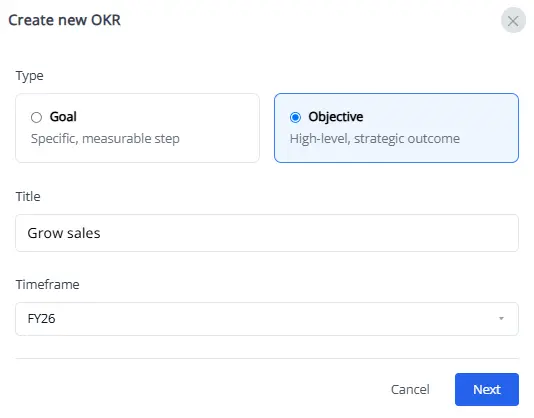
Step 2: Choose how progress is tracked
Next, choose how you'll measure progress. You can track it automatically with connected data, update it manually, or aggregate results from other goals.
Manual -
Track your progress manually by setting a starting value and a target value, selecting a unit type (number, percentage, or currency), and update your progress as you achieve milestones.
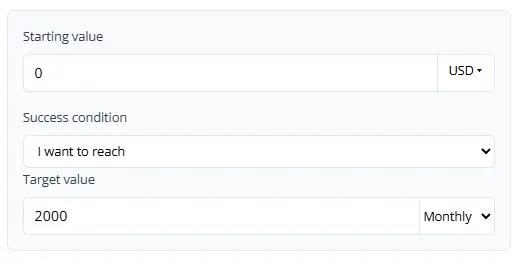
Use this for offline or qualitative goals that aren't tracked automatically.
Sub-goals (Automatic) -
Progress is automatically calculated from linked sub-goals. Select a measurement type—percentage average, number sum, or currency sum—and the parent goal will update as sub-goals progress.
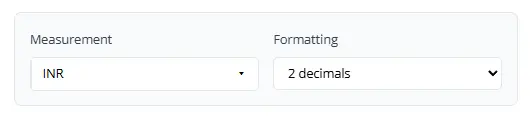
Use this when you want a higher-level objective to reflect the progress of multiple goals.
Step 3: Adjust granular objective values (Optional)
By default, target values apply to the current and future periods. To edit or include values for past periods:
- Click Advanced Settings to open customization options.
- Select Adjust manually in the bottom-left corner.
- Enter the desired values for each period.
- Click Save to confirm your changes.
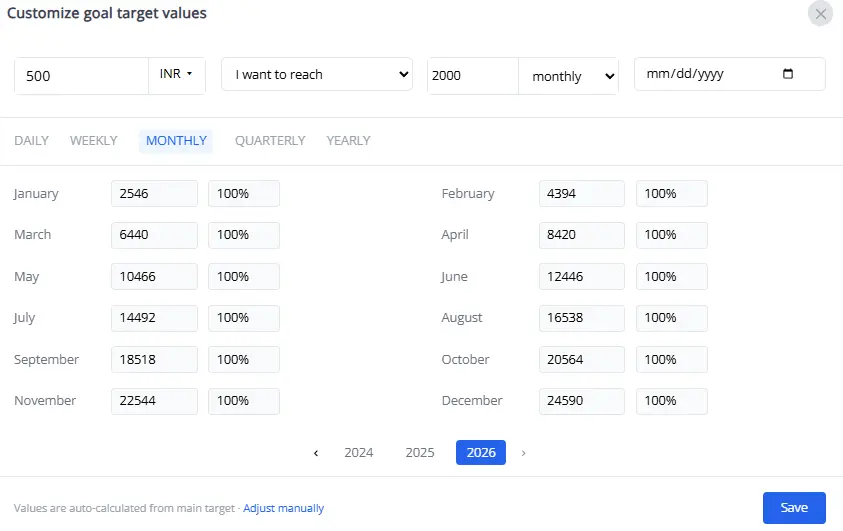
Step 4: Status Updates
Use the Status Updates section on a goal's detail page to keep progress up to date. The available update options depend on whether the goal tracks progress automatically or manually.
Automatic Progress (Sub-goal–based) -
Update frequency: Daily, weekly, monthly, quarterly, or whenever the objective's status changes (for example, from On Track to At Risk or Off Track).
Purpose: Keeps progress synchronized with changes in linked sub-goals and objective status.
Manual Progress -
Update frequency: Daily,weekly, monthly, quarterly or yearly.
Purpose: Helps the goal owner stay on track with manual progress update.
Create a sub-goal
You can create a sub-goal directly from a goal or objective's details page. Sub-goals contribute to the progress of their parent goal or objective, helping you track how individual initiatives support overall outcomes.
- On the OKRs page, locate the goal or objective you want to add a sub-goal to.
- Click the down arrow (chevron-down) button to open the menu options, then select View details.
- On the details page, scroll to the Sub-goals section.
- Click + Add goal.
Follow the same steps described in Create a goal to define the goal details and choose how progress is tracked.