
Maximizing Success with Facebook Insights

Key features to use Facebook Insights on StatNexa

Page Performance Metrics
Audience Demographics and Behavior
Engagement Tracking (Likes, Comments, Shares)
Reach and Impressions Analytics
Post Performance Analysis
Audience Growth Insights
Actionable Recommendations for Optimization
Custom Date Range Reporting
Pre-Built Template View
You can now explore and preview pre-built templates before applying them. Instantly streamline your StatNexa automation with ready-to-use workflows—no coding required. Just preview, select, and deploy in a click!

Integrating Facebook Insight with StatNexa
Facebook is a key platform for online engagement, with nearly 2 billion daily active users. A strong business presence is essential to connect with your audience effectively.
By integrating Facebook Insights with StatNexa, you can track page performance, analyze audience interactions, and identify opportunities for growth. Gain data-driven insights to optimize your content strategy and maximize engagement.
How to connect Facebook Insights account with StatNexa
All the Metrics and Dimensions you need for Fcaebook Insights
Dimensions
Metrics
Explore Our Ready-Made Widgets:
Effortless Solutions at Your Fingertips
Improve efficiency with widgets preloaded with key KPIs. Just drag and drop and you're done, turning data tracking into a seamless experience. Easily extend your analysis.
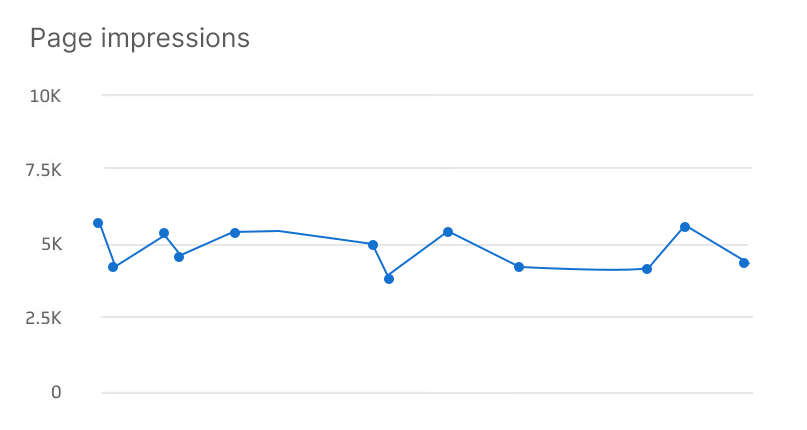
Page Impressions

Engagement Rate
StatNexa is your all-in-one marketing analytics solution.
The easiest way to grow your business? Scale what works and ditch what doesn’t. Custom Segments help you identify what’s effective—whether it's emails, lead magnets, webinars, and more—to boost your marketing.
Available Metrics, Segments, & Dimensions
Users typically incorporate specific metrics and dimensions when compiling reports for their Facebook Insights analytics.
Total Page Reach
Action Button Clicks
New Fans (New Page Likes)
Fans (Page Likes)
Followers
Page Organic Reach
Page Organic Impressions
Page Paid Reach
Page Viral Impressions
Page Views
Total Actions on Page
We have more 60+ metrics and dimensions available for your business.
Feel free to connect and create your custom dashboard.
If your question is not answered here,
please Contact Us directly!
What is a Facebook Insights dashboard?
A Facebook Insights dashboard visualizes key Facebook Page metrics in one place. It helps marketers track reach, impressions, engagement, followers, page views, post performance, and audience growth without manually compiling reports.
What does the StatNexa Facebook Insights integration do?
StatNexa connects Facebook Insights data to customizable dashboards and reports. It helps marketers monitor Page performance, audience engagement, content reach, follower growth, and other Facebook KPIs from a centralized reporting platform.
What Facebook Insights metrics can I track in StatNexa?
You can track metrics such as Page Reach, Impressions, Followers, Page Likes, Engagement Rate, Page Views, Post Reach, Post Impressions, Video Views, Reactions, Comments, Shares, and Actions on Page.
Can I track Facebook post performance with StatNexa?
Yes. StatNexa lets you analyze post-level metrics such as reach, impressions, likes, comments, shares, engagement, and video views. This helps identify which Facebook content generates the strongest audience response.
Can I analyze Facebook audience demographics in StatNexa?
Yes. Facebook Insights supports audience dimensions such as age, gender, city, country, and language. These insights can help marketers better understand their audience and refine content and targeting strategies.
Can I create automated Facebook Insights reports?
Yes. StatNexa helps streamline Facebook reporting by bringing connected Insights data into dashboards and reports. This reduces manual data collection and makes recurring Facebook performance reporting easier for teams and agencies.
Can I combine Facebook Insights with other marketing data?
Yes. StatNexa can display Facebook Insights alongside data from other connected marketing and analytics platforms. This provides a broader view of social media and cross-channel marketing performance.
Which Facebook KPIs should I include in a client report?
Choose KPIs based on campaign goals. For awareness, track reach and impressions. For engagement, monitor reactions, comments, shares, and engagement rate. For audience growth, focus on followers, new fans, and Page Likes.
How can Facebook Insights improve social media strategy?
Facebook Insights helps identify trends in reach, engagement, audience growth, and content performance. Marketers can use these patterns to understand what resonates with their audience and make better-informed content decisions.
 Contact Us